
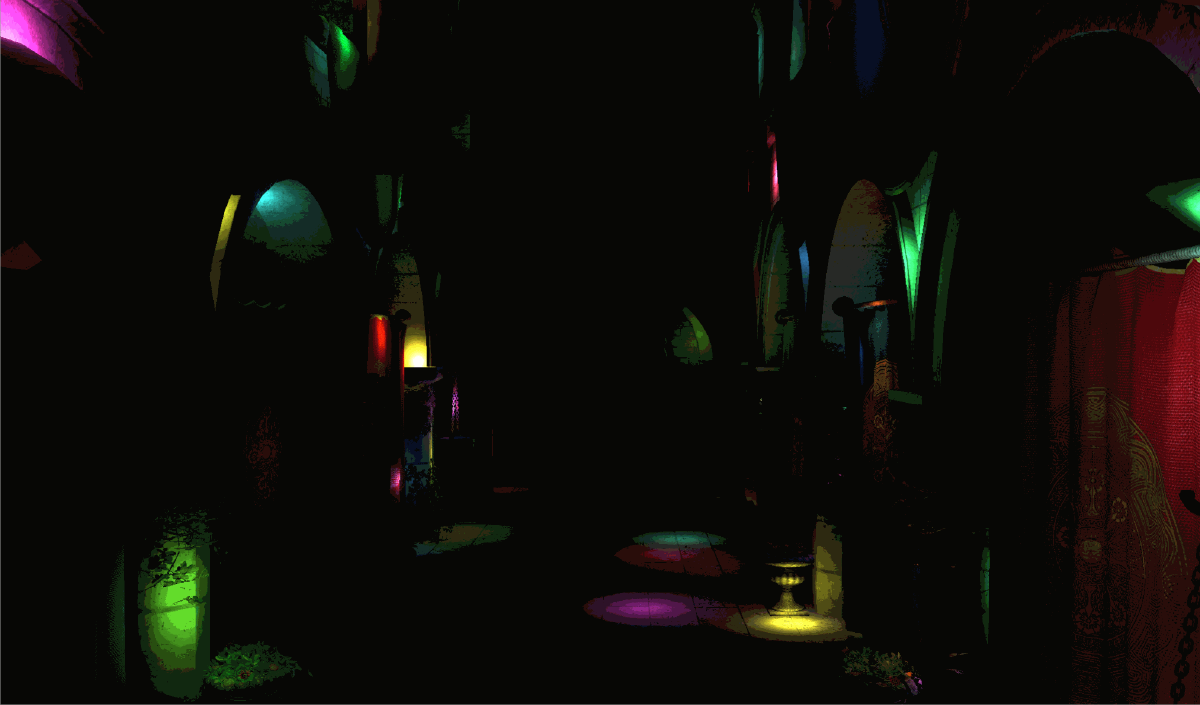
Check out the repository for this project here, or try the live demo in a WebGPU-enabled browser!
About#
Following the curriculum for UPenn’s GPU Programming and Architecture, I implemented three renderers in WebGPU for a scene lit by thousands of moving point lights: a naive forward renderer, a Forward+ renderer, and a clustered deferred renderer. The latter two share a compute shader that bins the lights into clusters of the view frustum, so each fragment only has to consider the lights that can actually reach it.
All benchmarks were run on Windows 11 with an Intel Ultra 9 275HX (2.70 GHz), an RTX 5070 Mobile, and 32 GB of RAM.
The problem with lights#
How do you handle lights in a rasterized real-time program? You don’t have the luxury of accumulating samples over many frames; each frame, the fragments need to reflect the influence of the lights.
For our purposes here, lights are point lights, with a position, a color, and a shared radius of influence.
Implementations#
The naive approach#
The most obvious approach is, for each fragment, to simply iterate over all of the lights and accumulate each light’s contribution. This works okay for a low number of lights, but you can imagine it quickly getting out of hand as the lights begin to number in the dozens or hundreds.
Light clustering#
We can divide our view frustum into a bunch of clusters (mini-frustums). Each cluster occupies some region of the screen, which I’ve parametrized with clusterPixelSize and profile later. Clusters are also constrained to some range of z values, which we control by how we slice the frustum (linearly or logarithmically) and how many slices we take.
We then prune the number of lights each fragment has to check in a compute shader, with workgroups assigned to clusters. Each cluster computes its view space bounding box, then iterates over the lights to see if each light’s sphere of influence intersects that box. If it does, we add the light’s index to the cluster, stopping at some maximum number of lights per cluster, since a cluster can’t occupy an arbitrarily large amount of memory.
When I was starting, linear slices seemed like the intuitive choice, but I believe log slices often look better: they place more clusters close to the camera, where clusters are small on screen, so you’re less likely to drop lights.
If there are too many lights per cluster (the max cluster size isn’t big enough, the clusters themselves are too big, or there are just too many lights), you start seeing artifacts like these, where whole blocks of the screen are missing lights: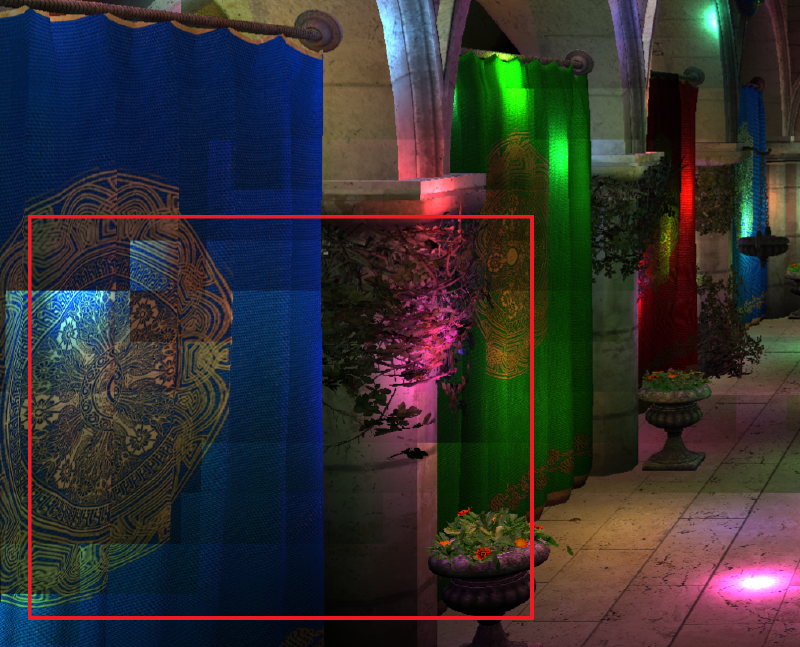
Forward+ rendering#
There are more sophisticated optimizations for Forward+, such as a z-prepass to eliminate clusters that aren’t visible (…but at that point, why even call it Forward+…?), but clustering the lights by view frustum clusters is the crux of it. In the fragment shader, we compute the view space position of the fragment, find its cluster, then loop over only the lights in that cluster.
Clustered deferred rendering#
Because fragments are processed in parallel, we have no notion of skipping fragments that will be overwritten by a closer fragment. That isn’t a problem when the fragment shader is simple, but it’s wasteful for expensive lighting calculations. While we’re not doing anything too fancy here, we still wouldn’t want to iterate over a bunch of lights for fragments we’ll never see.
Deferred rendering addresses this problem (and enables other previously impossible effects, which is beyond the scope of this project, but is something I’ve worked on in my physically-based deferred renderer) with a simple idea: write out the data of only the fragments we see, then do a second pass that shades using that data.
This comes with tradeoffs, such as making anti-aliasing and transparency harder, and (probably most importantly) increased memory usage. Only the last one matters here, and the extra memory isn’t much of a problem on a gaming laptop.
We store the fragment data in a series of textures collectively called the G-buffer. What the G-buffer needs to contain varies by application; here we only need each fragment’s world space position, normal, and albedo.
Once the visible geometry is written into the G-buffer, the second pass performs the clustered lighting calculations on only the fragments that matter, by rendering a fullscreen quad where each fragment loads the G-buffer data at its position on the screen.
Benchmarks#
A note on methodology#
Benchmarks were taken in Google Chrome, version 155.0.8059.85. Chrome typically caps the frame rate to the display’s refresh rate. Bypassing the cap made the renderer very hard to interact with, even though the frame rate was much higher and it should have been more responsive!
So with the help of an agent, I measured frame times with a GPU frame timer, averaging over 1000 frames after 1000 warmup frames. As you might expect, the naive renderer’s runtime blows up as the number of lights increases, so I didn’t take too many benchmarks of it.
First comparison#
My first benchmark used 10 z-slices, 32x32 pixel clusters, a max of 100 lights per cluster, and 64 threads per workgroup, with 5,000 lights:
| Renderer | Avg. frame time (ms) |
|---|---|
| Naive | 395.613 |
| Forward+ | 12.383 |
| Clustered Deferred | 2.886 |
Naive predictably performed poorly, though the comparison is a little unfair: with so few slices and such a low max light count, clusters frequently hit the limit, so the clustered renderers weren’t iterating over cumulatively as many lights as the naive one.
Cluster pixel size#
I increased the max number of lights per cluster to 150, then profiled how the cluster pixel size affects performance: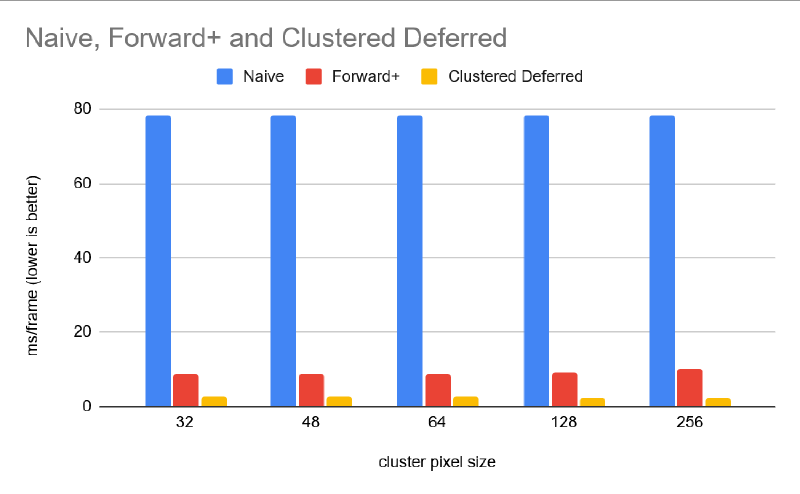
Since naive doesn’t use the clusters, it doesn’t move the needle. Forward+ held steady up to 64 pixels before slowing down at larger sizes. I believe this is because up to that point, there are fewer warps in which threads loop over different light lists, while the number of lights per cluster isn’t yet large enough for the extra looping to cost much.
Number of lights#
For a fairer comparison between Forward+ and clustered deferred, I set the max lights per cluster to 150 and the number of slices to 80, which mostly mitigates dropped lights (though some artifacts were still visible). Ideally, I think you’d set the max number of lights per cluster as a function of the cluster size and the number of slices.
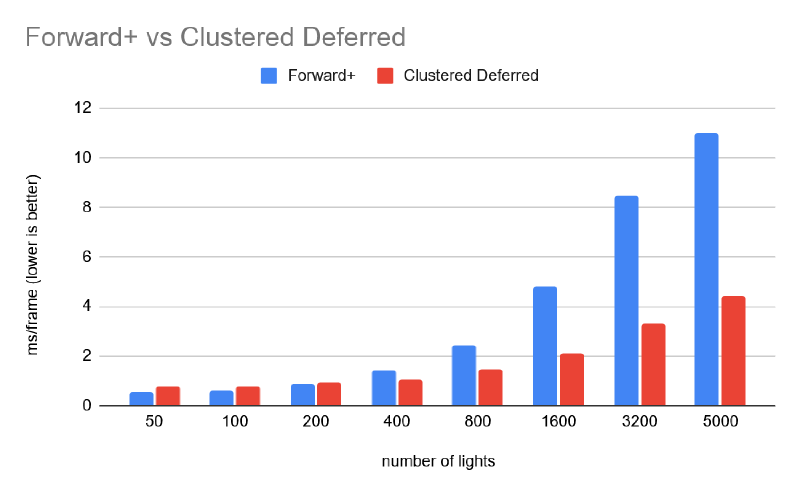
The results aren’t too surprising. At low light counts, Forward+ edges out clustered deferred, since clustered deferred adds an entire pass that must finish before the lighting pass, and the fragments it saves from lighting aren’t worth that cost when there are few lights to loop over. But clustered deferred pretty quickly takes over.
Note that at 5,000 lights, clustered deferred takes 4.408 ms here, up from 2.886 ms in the first benchmark.
Number of z-slices#
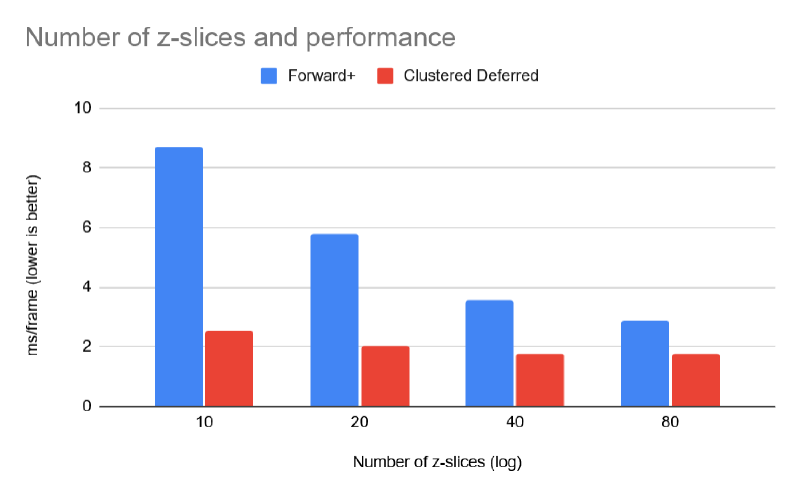
It seems intuitive that more slices would give better performance: with finer slices, each fragment tests against a more precise set of potentially relevant lights. The tradeoff is that it costs more memory.
Workgroup size#
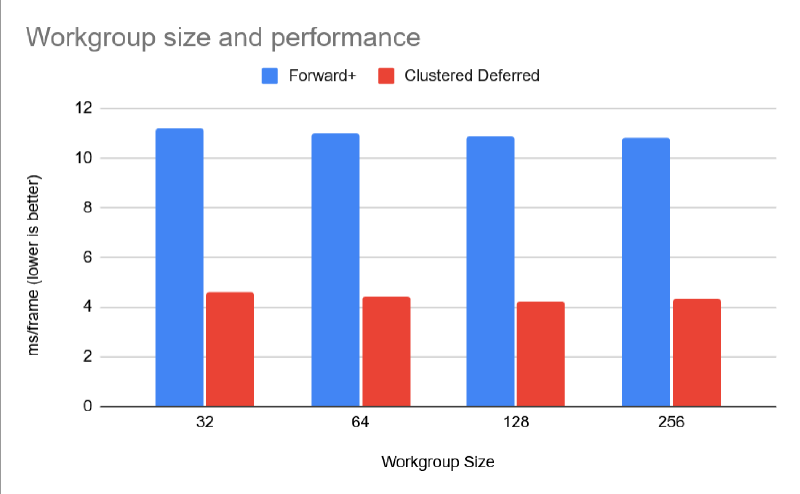
The configurations I tested had only a modest effect on performance, with the sweet spot around 128 or 256 threads. It makes sense that larger workgroups would help by speeding up the loop over the scene’s lights for each cluster.